Everything WordPress gives your clients, without the attack surface
A managed, multi-tenant CMS with no plugins to patch, no admin panel on the site your visitors load, and a penetration test every 15 days. Your clients edit their own content; your design and your security posture stay yours.
The breach vector is not there to exploit
Most WordPress compromises arrive through a plugin or through the login page sitting on the public domain. Neither exists here.
Trusted across Europe
Industries we serve.
Engineering teams in regulated, mission-critical industries — every engagement audited, documented, and production-grade.
FinTech
PCI-DSS compliant payments and core banking infrastructure — sub-100ms p99 latency, end-to-end audit trail, and tokenization at the edge.
Healthcare
HIPAA-aware patient data pipelines
Telecom
5G core network observability at scale
E-Commerce
99.99% uptime during peak traffic events
Government
Sovereign cloud with full audit trails
Logistics
Real-time fleet tracking & IoT ingestion
The difference is architectural, not a longer feature list
WordPress is not badly built. It is built so that the CMS and the public site are the same application — and that single decision is what produces most of the risk an agency carries on a client's behalf.
Lives on the public domain at /wp-admin, and is found and brute-forced by bots within hours of going live
Not on the client site at all. The admin runs on separate infrastructure; visitors load a site with no login form to attack
Dozens of third-party packages, each executing on your server with database access. This is where most WordPress breaches begin
None. There is no marketplace and nothing to install — features are code in your own repository, reviewed and version-controlled
Yours to chase, on every site separately, forever — and a skipped update is how a site gets taken
Ours, applied once, across every tenant at the same time
Depends on which plugin you installed for it
Every create, update, delete and login recorded and attributed, built in
A theme editor and plugin settings can alter layout, typography and markup after handover
Content blocks render through components from your repository. There is no CSS the client can reach
Whenever someone remembers, if ever
A penetration test every 15 days, run by the same team that does it for our consulting clients
Least privilege, and a record of every change
A client account can edit its own site's content and its own profile. It cannot reach another client's workspace, change its own role or read anything it was not granted. Everything anyone does is written down.
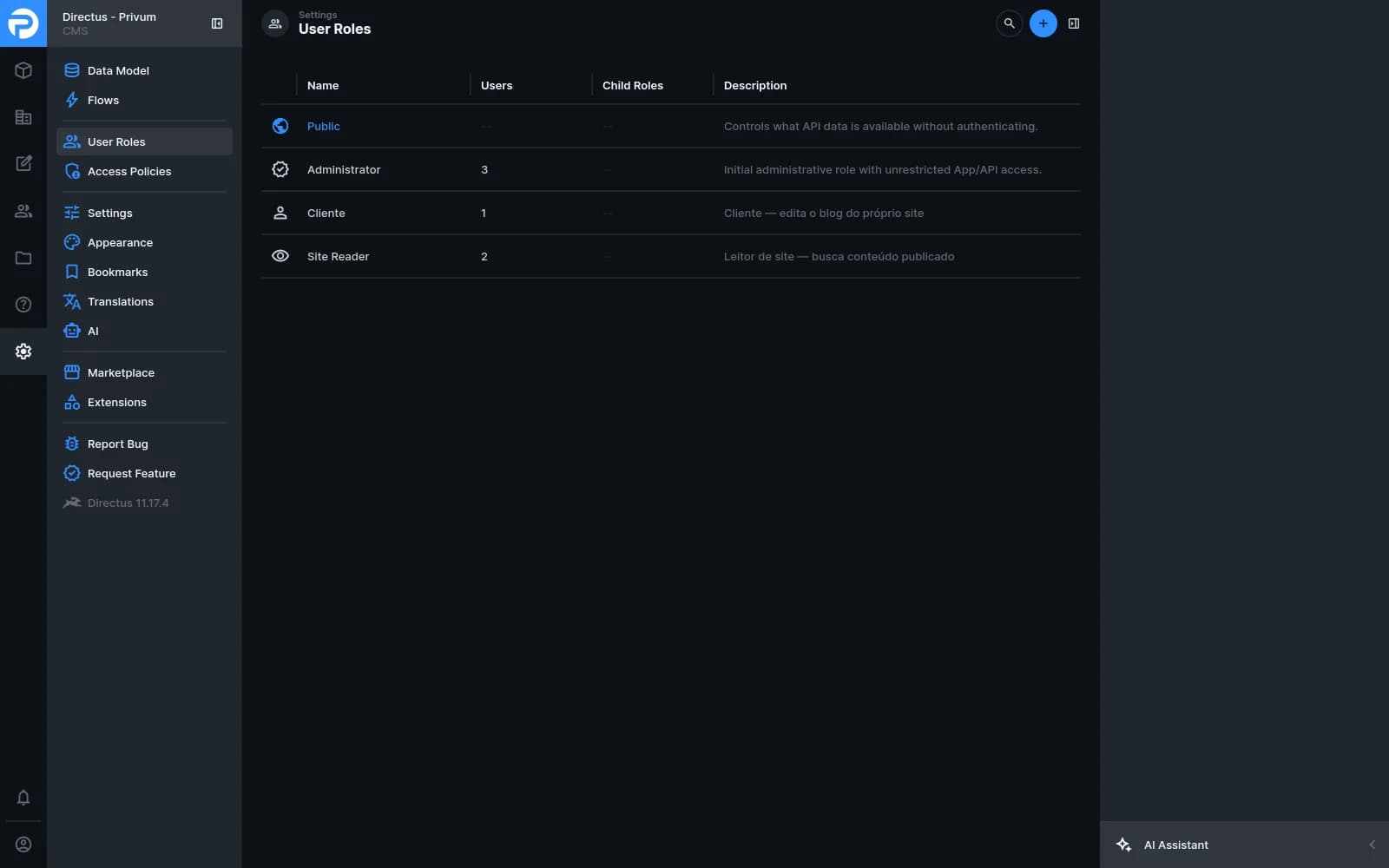
Four roles, each with the narrowest access that does the job. The site itself reads through a token that can only see published content.
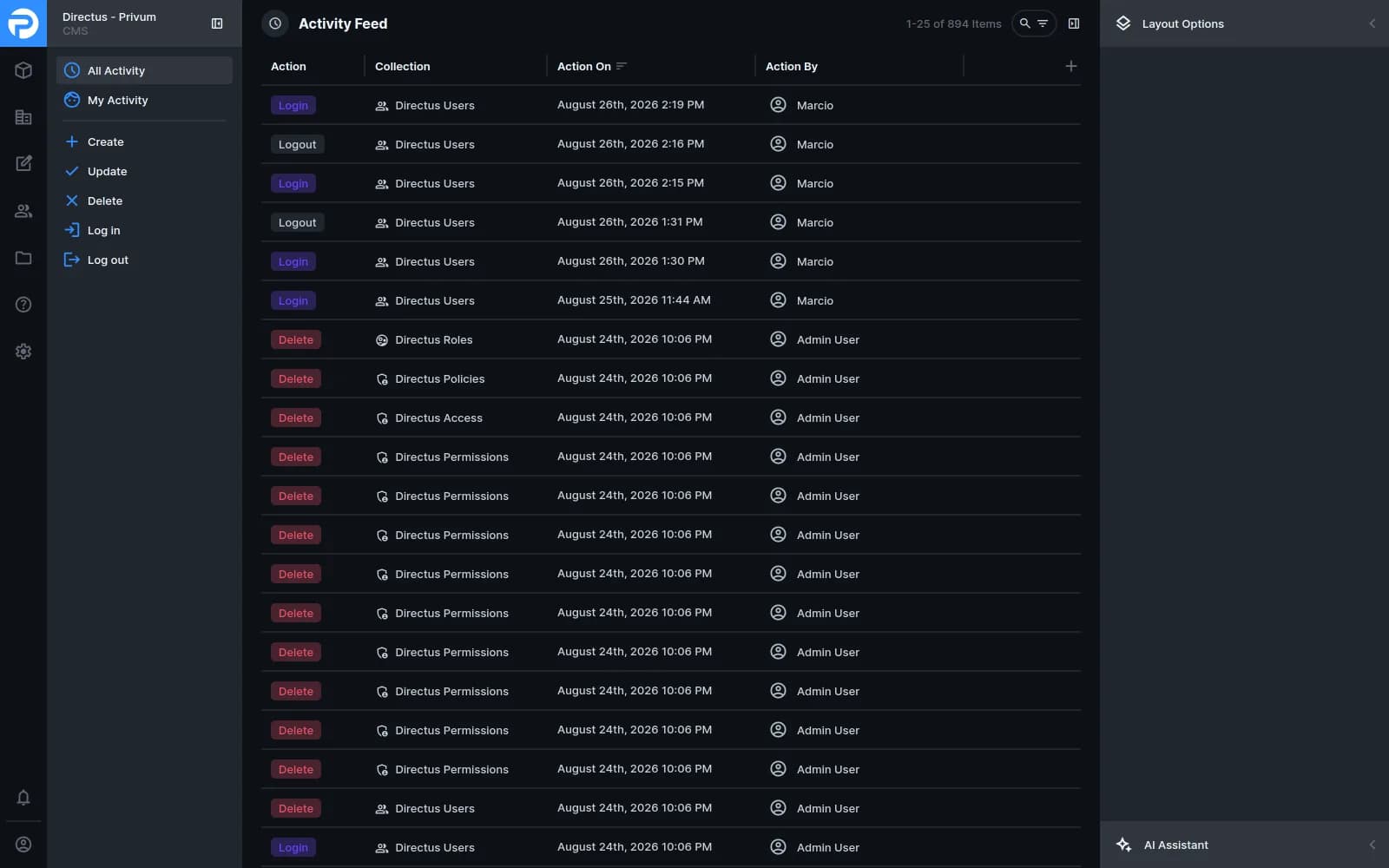
Every action attributed and timestamped, including logins. When a client asks who changed something and when, there is an answer.
Your client hits save. That is the whole workflow.
No rebuild to trigger, no deploy to approve, no message to your team. The content changes, the affected page is regenerated, and the URL never moves.
The client edits
They sign into their own workspace and change the copy, swap a hero image or publish a post. No staging branch, no ticket to you.
A flow fires
Saving triggers an automation that knows which site the content belongs to and calls that site — not every site you run.
The page rebuilds
The site revalidates just the affected cache tag. No full redeploy, no pipeline run, no cold start for visitors.
It is live
The next visitor gets the new page, server-rendered, at the URL it always had.
They rearrange the page. You still own how it looks.
Every block the client can add is rendered by a component from your repository. The CMS decides the order and the words; your code decides everything else. That is the line a theme-based CMS cannot hold once the site is handed over.
Fewer things that can go wrong on your watch
The value is not the editor — every CMS has one. It is that one hardened platform covers every client you run, and that keeping it safe is our job rather than a recurring line on your maintenance retainer.
- 01
The breach vector is simply absent
You cannot be compromised through a plugin you never installed, or through an admin login that is not on the site being served.
- 02
Patching stops being per-site homework
One platform is upgraded once. You are not logging into twelve dashboards to apply the same update twelve times.
- 03
Content stops being your queue
The "can you just change this line" requests go straight to the client instead of landing on your delivery board.
- 01
We provision the tenant
A workspace, least-privilege roles and a read-only token for the site. Your client gets a login; you get a token for the site config.
- 02
We wire the site
The shared package goes in, content is fetched at render time, and the blocks you already built become editable blocks.
- 03
We migrate what exists
Posts and pages move across with slugs intact, so nothing that is indexed today changes address.
- 04
We test it every 15 days
The platform goes through the same penetration testing our security engineers run for consulting clients, on a fortnightly cycle.
How we work
From first call to production — a proven 4-step engagement model that keeps the conversation transparent and the velocity honest.
- 01
Discovery
We audit your current stack, identify gaps, and align on business goals.
- 02
Assessment
A detailed roadmap with priorities, effort estimates, and quick wins.
- 03
Delivery
Our engineers embed with your team and execute sprint by sprint.
- 04
Support
Ongoing monitoring, optimization, and knowledge transfer to your team.
Related services
Adjacent practices that pair well with this one — most engagements blend two or three.
Frequently asked questions
Practical answers about scope, timelines, and how engagements with our Privum CMS team usually look.
Weighing this against staying on WordPress? We wrote up where WordPress breaches actually come from, including the case for staying put. The fortnightly testing is run by our cybersecurity practice. If you want the site built as well as the CMS, that starts at web development — and the portfolio shows what the two look like together.
See Privum CMS in action
Book a 30-minute demo with our team — we'll show you exactly how it works with your stack.