Stop Managing DNS Records
in Spreadsheets

A free, open-source Bind 9 web interface with SSO, role-based access, and a full audit trail. Deploy in minutes — manage zones, records, and teams from a single dashboard. Free & open-source · 10x faster changes · Full audit trail · Keycloak SSO

Trusted across Europe

Industries we serve.

Engineering teams in regulated, mission-critical industries — every engagement audited, documented, and production-graded.

Banking & Payments

FinTech

PCI-DSS compliant payments and core banking infrastructure — sub-100ms p99 latency, end-to-end audit trail, and tokenization at the edge.

PCI-DSS · ISO 27001
Patient Data

Healthcare

HIPAA-aware patient data pipelines

HIPAA · SOC2
5G & Networks

Telecom

5G core network observability at scale

NFV · ETSI MANO
Retail & Marketplaces

E-Commerce

99.99% uptime during peak traffic events

PCI-DSS · GDPR
Sovereign & Public

Government

Sovereign cloud with full audit trails

eIDAS · FIPS 140-2
Fleet & IoT

Logistics

Real-time fleet tracking & IoT ingestion

MQTT · OPC-UA
Operating numbers

Engineered for DNS at scale

The reason teams pick DNS Manager over hand-edited zone files and SaaS DNS panels — built for control, audit, and automation.

FreeNo licensing cost
10×Faster DNS changes
RBACTeam access control
SSOKeycloak / enterprise IdP
Product screens

A clean interface, made for ops teams

2FA, audit-trail, and at-a-glance zone health — see what your team gets after a 5-minute install.

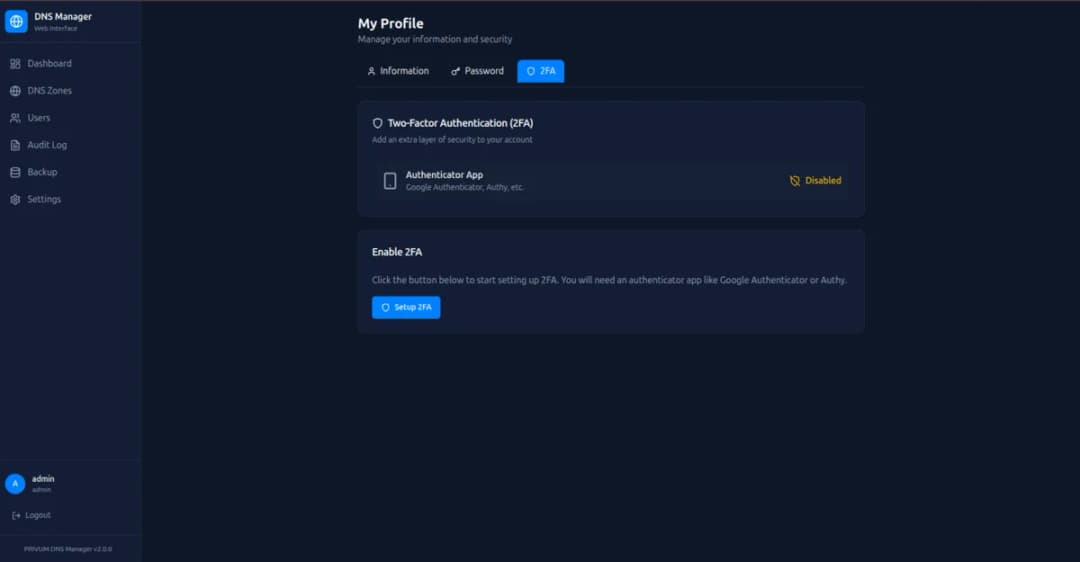
Two-factor authentication

Enable 2FA with Google Authenticator or Authy for enhanced account security.

Two-factor authentication

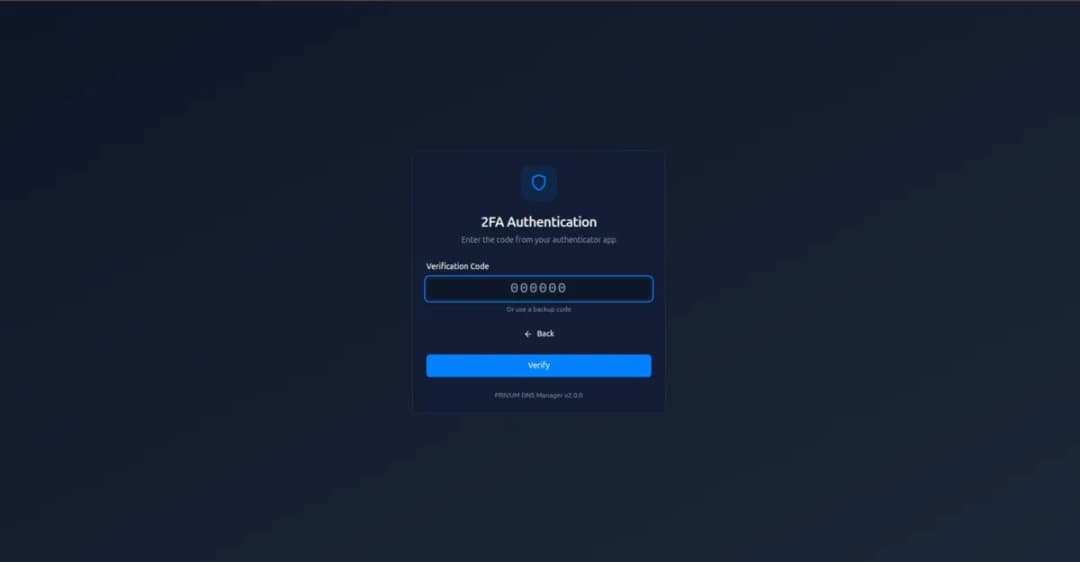
Secure 2FA login

Protect your DNS infrastructure with multi-factor authentication on every login.

Secure 2FA login

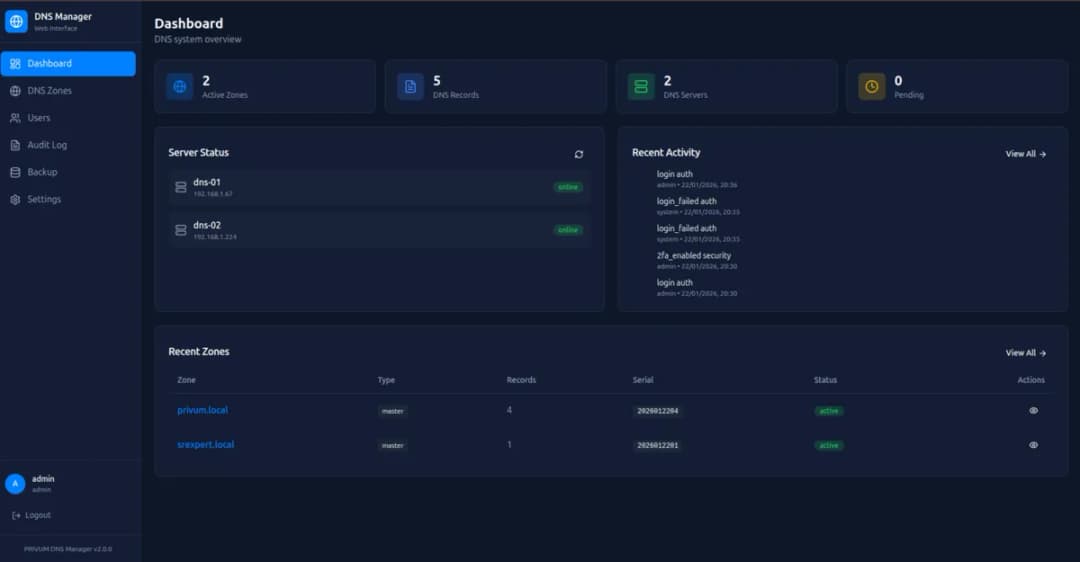
DNS operations dashboard

Real-time visibility into zones, server status, and recent activity at a glance.

DNS operations dashboard

Platform features

Everything DNS at scale needs

Built around the operational reality of running a Bind 9 fleet — multi-master replication, audit, and sane defaults.

Eliminate multi-console sprawl that wastes hours per week. Manage all your DNS zones and records from a single, intuitive dashboard with real-time validation.

↓ 90% management time · single pane of glass

Protect DNS infrastructure from unauthorized changes with built-in 2FA via authenticator apps and optional Keycloak SSO integration for enterprise identity management.

2FA enforced · Keycloak SSO ready

Control who can view, edit, or administer DNS with role-based access controls and team management that prevents accidental or unauthorized changes.

RBAC enforced · team management

Stop editing zone files by hand and risking syntax errors. A modern web interface manages Bind9 zones, records, and serials safely with validation before every change.

0 syntax errors · validated changes

Meet audit requirements with a complete version history of every DNS change. Know who changed what, when, and why — with rollback capability for quick recovery.

full audit trail · rollback capable

Integrate DNS into your CI/CD pipelines and IaC workflows. REST API enables programmatic zone and record management for full automation of DNS operations.

REST API · CI/CD ready
Free assessment

Get a free DNS Manager assessment

Our engineers review your current setup and deliver a prioritized roadmap — no strings attached.

Record types supported

Every record type your infra needs

DNS Manager exposes the full Bind 9 record vocabulary — A, AAAA, CNAME, MX, TXT, NS, SOA, and SRV — with inline validation that catches misconfigured records before they ship.

AAddress record

Maps a hostname to an IPv4 address

NAMEapi.example.com
VALUE203.0.113.42
TTL3600s
AAAAIPv6 address

Maps a hostname to an IPv6 address

NAMEapi.example.com
VALUE2001:db8::42
TTL3600s
CNAMECanonical name

Aliases one hostname to another

NAMEwww.example.com
VALUEexample.com
TTL86400s
MXMail exchange

Routes email to a mail server

NAMEpriority 10
VALUEmail.example.com
TTL3600s
TXTText record

SPF, DKIM, and verification records

NAME@
VALUEv=spf1 include:_spf.google.com
TTL300s
NSName server

Delegates a zone to nameservers

NAMEsubdomain
VALUEns1.example.com
TTL86400s
Requirements & install

Live in under 10 minutes

Three commands, no configuration file editing. The installer provisions BIND9, the API, and the web UI on one host — slave servers join the cluster with a token.

Linux distributions

  • DEBUbuntu 20.04 / 22.04 / 24.04
  • DEBDebian 11 / 12
  • RHLRHEL / CentOS / Rocky / AlmaLinux 8 · 9

OpenSUSE and other distributions are not currently supported.

Minimum specs

  • RAM2 GB minimum
  • CPU1 vCPU (2+ recommended)
  • DISK10 GB available

Install git if not present

Choose your distribution to get the right command.

$sudo apt-get install git
Why DNS Manager

Built for the way you actually run DNS

We replaced manual zone-file editing, multi-console sprawl, and shared credentials with a single platform built for teams who need speed, control, and compliance.

10× faster changes

Deploy DNS changes in seconds instead of hours with automated validation and one-click rollback.

Zero downtime

Inline validation rules catch typos before they ship, and rollback is one click away.

Audit-ready compliance

Complete change history with user attribution — pass audits without scrambling for evidence.

Engagement model

How we work

From first call to production — a proven 4-step engagement model that keeps the conversation transparent and the velocity honest.

  1. 01

    Discovery

    We audit your current stack, identify gaps, and align on business goals.

  2. 02

    Assessment

    A detailed roadmap with priorities, effort estimates, and quick wins.

  3. 03

    Delivery

    Our engineers embed with your team and execute sprint by sprint.

  4. 04

    Support

    Ongoing monitoring, optimization, and knowledge transfer to your team.

Common questions

Frequently asked questions

Practical answers about scope, timelines, and how engagements with our DNS Manager team usually look.

DNS Manager is a free, open-source Bind 9 Web Interface that provides a modern UI for managing DNS zones, records, and server configurations. It includes SSO integration with Keycloak and role-based access control for teams.
Yes, DNS Manager is completely free and open-source. You can download it from GitLab and deploy it in your own infrastructure with no licensing costs.
Yes, DNS Manager is specifically designed as a Bind 9 Web Interface. It provides a graphical UI to manage Bind9 zones, DNS records, serial numbers, and named.conf configurations without editing files manually.
DNS Manager integrates with Keycloak for Single Sign-On (SSO), enabling secure authentication with MFA support, LDAP/Active Directory integration, and centralized identity management for your organization.
Yes, DNS Manager includes role-based access control (RBAC) that allows you to assign different permission levels to team members. You can control who can view, edit, or administer DNS zones and records.
Yes. DNS Manager is a free, open-source web GUI for BIND 9 — a browser-based interface (web UI) for managing BIND9 DNS servers without editing zone files by hand. There are no licensing costs: you self-host it on your own infrastructure.
DNS Manager installs in minutes with a single command on Ubuntu 22.04/24.04 or Rocky Linux 8/9: run the master installer script, then join any slave servers with the generated token. It provisions BIND9, the web UI, and the API together — no manual editing of named.conf required.
Webmin and Cockpit are general-purpose server admin panels with a BIND module added on. DNS Manager is purpose-built for BIND 9: it understands zones, records, and serials natively, validates every change before writing, handles master/slave replication and zone transfers, and adds team features general panels lack — RBAC, Keycloak SSO, MFA, and a full audit trail.
Yes — that is exactly what DNS Manager is for. From the web interface you create and edit zones, manage A, AAAA, CNAME, MX, TXT, NS, SRV, and PTR records, and handle serials, with real-time validation that prevents the syntax errors that break hand-edited zone files. A REST API exposes the same operations for CI/CD and infrastructure-as-code.
Yes. DNS Manager runs a master/slave (primary/secondary) architecture: the master manages and serves zones, and slave servers receive updates automatically via AXFR zone transfers. You add slaves from the master web interface with a join token, so replication is configured for you.
Talk to engineering

Let's talk about your DNS Manager strategy

Whether you're starting from scratch or scaling what you have, our engineers are ready to help.